
When considering the tech stack for our new website, we were looking for a modern, simple and content focused solution. A company website is often quite straight forward and doesn’t require the many sophisticated parts that we’re used to when building products for our clients. We wanted the focus on the content and a great user experience. Initially a static site generator should be a good fit for our needs. But we also wanted to have a modern development experience and the ability to develop the site further in the future. Astro felt like a great choice for us. In this article we’ll share our initial thoughts and learnings of building this site with Astro.
To recap, our requirements were:
- Content focused with great UX
- Modern DX
- Future proof
What is Astro?
Astro is marketed as a “web framework for content-driven websites” meaning, blogs, promotional and e-commerce sites. It started out as a static site generator but has grown a lot as they’ve kept releasing new version (v4 being the current version at the time of writing). Now, Astro can handle static site generation (SSG), server-side rendering (SSR) and a hybrid between the two, much like one of its biggest competitors, Next.js. Sure, Next.js comes with more advanced rendering strategies like incremental static regeneration (ISR) out of the box but with some tweaking it’s possible to achieve similar results with Astro.
A contender that shows promise
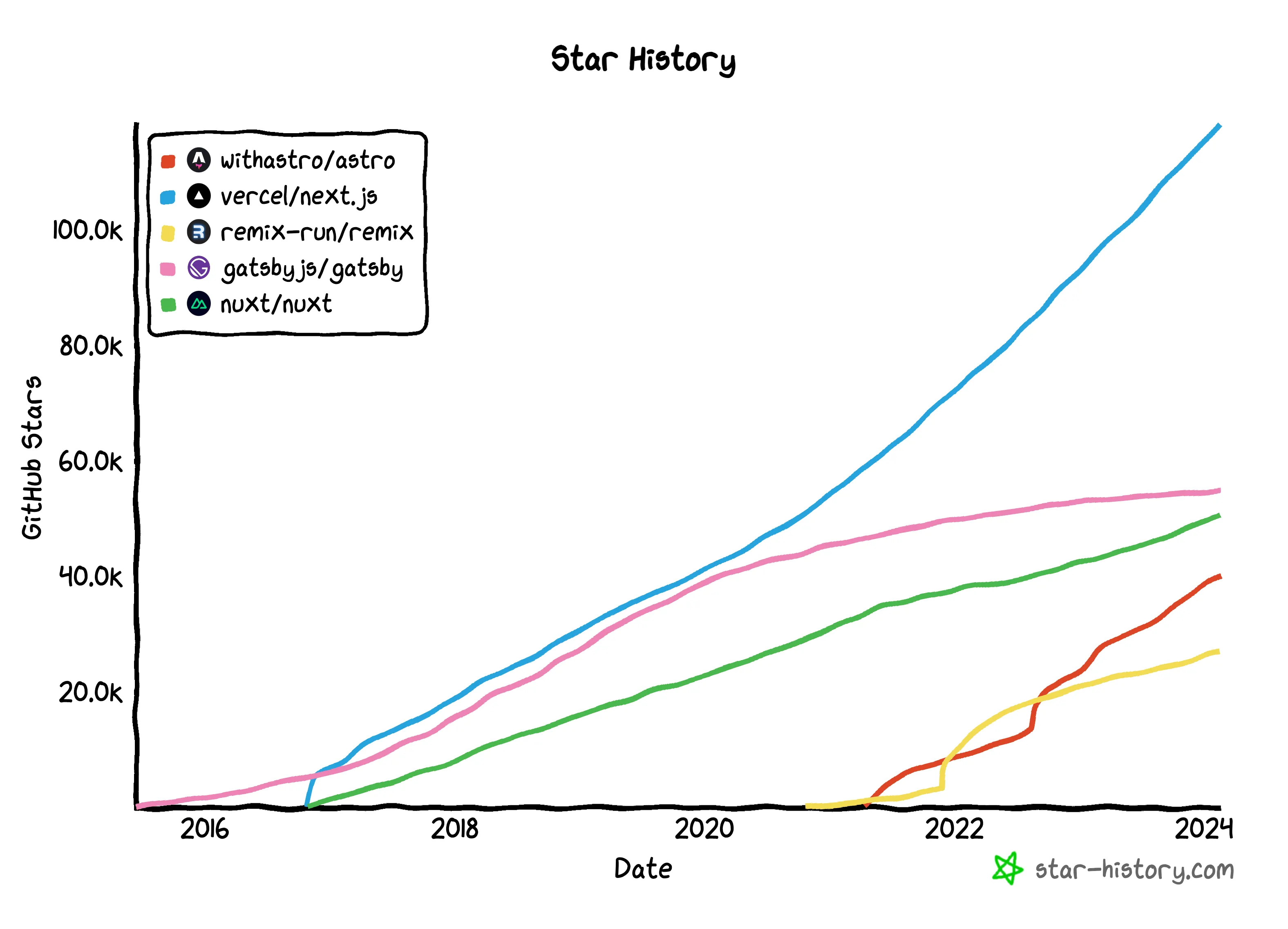
I don’t promote picking your tech stack based on which framework has the most stars on Github. But it can be a valuable tool to see how it stands against the competition and how it’s trending. You likely want to pick a technology that has many years of active development and a large following. Astro has been around for a few years and has a continuous growing amount of stars on Github. They have an active Discord server and there’s a lot of content produced by the community on Youtube and blogs. This is a good sign that the framework is here to stay and that there’s a lot of resources available to help you get started and solve any issues you might run into.
Island architecture
Astro ships without any client-side scripts out of the box. As a developer you have the option to make certain parts of your site dynamic with client-side Javascript by creating “islands”. This is an architecture pioneered by Astro and I really like the idea of shipping only the stuff you need to the client. The Qwik framework has a similar approach and it’s more or less the opposite of Next.js sites.
What issues did we run into?
The overall experience of building this site with Astro has been great. But there has been a few inconveniences that I’d like to share.
The name
Don’t get me wrong here, I think the name is really nice but it’s really hard to google for. I’ve had to add “astro framework”, “astro.js” (why not?) and the like to my search queries to get relevant results. This is a minor issue but it’s still a bit annoying.
Interop with client-side libraries
One of the biggest selling points of Astro is the “island” architecture. So it caught me by surprise when the DX wasn’t as I expected. We opted to use Preact, due to it’s small size and our extensive experience with React and JSX, in the few places where we needed client-side interactivity. The issue we ran into is a combination of Astro’s “slots” functionality, Typescript and Preact.
I wanted the Preact component to accept an Astro component as a prop. This can be done using “slots” in Astro. The Astro component is conceptually required in the Preact component. Since we’re using Typescript I thought I could just mark this as a required prop. Herein lies the problem. Since I’m passing the component as a slot from Astro, it can’t be typed as a required prop because that will cause Typescript-errors. The solution was to make the prop optional and then do a runtime check in the Preact component. I don’t like this solution but I couldn’t figure out a better way to do it.
View transitions
The basic view transition support in Astro works great. Just by adding a couple of lines you can get a nice fade animation between pages. It wasn’t until I started to get fancy with it when I ran intro trouble. My goal was to have a “morph” animation of the blog hero image in the blog list view to the blog post view. Astro has this covered and the documentation is clear but I couldn’t get it to work. I’m not sure if there’s a bug in the framework or if I’m doing something wrong but I ended up having to use a little hack to get it to work.
Instead of using the directive provided by Astro (transition:name="my-name") I had to use a bit of inline CSS to get the effect I wanted (style={{"view-transition-name": "my-name"}}). This is not a big issue but it’s a bit annoying that I couldn’t get it to work as intended.
And the good parts™?
Astro has stayed true to their “content-driven” roots by providing a great support for Markdown and MDX out of the box. The router is folder based, which makes the folder structure feel familiar to its competitors and I quite like it. Here are a few other things in no particular order that I’ve enjoyed about Astro:
The island architecture
The thought model of the island architecture is really nice. Once you get past the initial pitfalls you can easily build complex sites and inject a bit of client-side interactivity where you need it.
The developer experience
The CLI for creating a new project and adding new integration works great. If you’re using VS Code there’s a great extension that provides both nice syntax highlighting and functionality to easily run and debug the project.
For the most part, the documentation is great. And if there’s something you can’t find in the docs, chances are that you can find a blog post or Youtube video made by the community that covers it. They also have an active Discord server if that’s your kind of thing.
You get a nice little toolbar at the bottom of the page when you’re in development mode. I found the “audit” functionality to be really helpful, it can help you with accessibility issues that you might have missed.
The integrations
There are many first-party supported integrations. For example, this site is using Tailwind CSS and Preact. Both of these are added as integrations and it was as easy as typing npx astro add tailwind and npx astro add preact in the terminal. This installs the necessary packages and gives you the basic configuration to get started.
You can easily find any integration you might need in the Astro integrations page.
The community
There are a lot of resources available to help you get started with Astro. The way I went about it was to read the official documentation, look at a couple of tutorials on Youtube and check out some open source themes on Github which you can find through the Astro themes page.
Conclusion
Astro has been a great fit for us. It’s a modern, content-driven meta framework that has a great developer experience. The island architecture is a great concept and the integrations are easy to use. The community is active and there are a lot of resources available to help you get started. We’re looking forward to see how Astro evolves and we’re excited to see what we can build with it in the future.
If you have any questions about the project, software development or Astro, feel free to reach out to me on Twitter or LinkedIn. I’d be happy to help you out. You can also check out the repo for this site on Github and see how we’ve built it.